Posts Tagged ‘class meeting’

h1

Class 2: Project teams

February 21, 2014

CLASS SUMMARY:

The class started with each student presenting an ‘elevator pitch’ that essentially consisted of a brief introduction to themselves, their area of study, and particular interest in this module.

This was followed by a presentation on team working skills by guest tutor and module graduate Sitearm Madonna.  The slides for this presentation can be viewed here: http://www.slideshare.net/sitearm/virtual-collaboration-tips-and-tools

The participants were then divided into three groups and the module project was introduced and discussed. Full details and the project specifications are given on page 6 Module Assessment. The theme for the project is: ‘Reality’. There is a growing tension between what is considered reality by different generations and groups in society. We know it is possible to live predominantly in a virtual medium and this trend is likely to continue and be more easily afforded with ongoing technological advances. Each participant is asked to explore what makes up reality to themselves and, in particular, how any virtual lives and online engagements are integrated into their daily reality.

The three groups decamped across Akron Island to allow the members to get to know each other, discuss how they might proceed as a group, arrange communication channels and meeting times.

The teams are:

  1. ania, Daniel, Sam, Michael, Knitsy, and Mitch Madness
  2. Seranox1, Irale, Leela, Mandana, and Twinkle Toes
  3. Q, Benisgreat, Knightt, Lewis, Andrew, and Garrett

Please note: There are at least two other Akron students who cannot make it to our Thursday meetings. They are not on a team yet, but if you can coordinate other times to meet with them and other ways to communicate, please recruit them to your team.  They are: Lindsay and SteveSykes (you can search for them and find them in SL).

ACTIVITIES FOR NEXT CLASS:

  1. Explore: Get to know your group members and explore SL with your group. You are to visit at least 3 locations that are new to you. Find them in search, or ask other residents for recommendations or select them at random.
  2. Discuss: ideas for your project with your group how you are going to develop the project.
  3. Write: the second post on your blog reviewing the locations you visited. Explain how and why you chose them and what relevance they might have for your group.
  4. Read: Personal Branding Basics for 2011 (accessed on 02/21/14) by Chris Brogan, expert in online community, social media, and related technologies.

There is plenty of interesting writing about Second Life and virtual worlds across the web in online publications such as Virtual Worlds Magazine. Seek them out and try to discover others for yourself.

Virtual Anthropology and the Prometheus Myth (accessed on 02/21/14) by Salahzar Stenvaag in Virtual Worlds Magazine

Forget Playing Games. Meet the Man who wants to Empower you to Make Games (accessed on 02/21/14) by Stephen Totilo in kotaku.com

Your Second Life is Ready (accessed on 02/21/14) is an interesting, and still relevant, introduction to Second Life from Popular Science in 2005.

h1

Class 1: Dublin meets Akron

February 14, 2014

CLASS SUMMARY:

This first class for the Dublin participants was held in Akron Island, virtual home of the University of Akron. We will probably meet there for our next class meeting, too. The Akron students have been meeting here for the last three weeks. After we all introduced ourselves Dudley, John and Locks spoke about the module in general and gave some details of what to expect over the next weeks. It was also agreed to change the time of the class meeting to 8.30–9.30 pm.

  1. The format of the class is interactive discussion, based on reading material provided prior to the class. You need to have read the material posted in advance (or else next class will be longer to allow for catch-up).
  2. You will need to spend time in SL outside the normal class time to complete tasks and activities.
  3. Check this blog regularly for updates on the module. Information will also be posted to Twittter using the hashtag #iole14. When you post to Twitter don’t forget to include this hashtag.
  4. After each class you will be given a topic to write about in your blog. It is important to keep your blog up to date as this will ensure you don’t have an excessive amount of work to do at the end of the module. The blogs will be graded using the rubrics found here.
  5. Academic writing standards must be adhered to always.
  6. Every week, visit a new location in SL and refer to it in your blogpost.

Academic writing

Part of the methodology for this module is to use writing as a mechanism for learning and as a goal in itself. We hope that by the end of this module you are confident in writing as well as being familiar with conventions around accountable writing. the following points were addressed:

  • Forms of writing to use include: Narrative, Descriptive, Reflective, Critical.
  • Sourcing reliable information is essential: where to find it, deciding what it okay to use (judging sources)
  • Correct referencing is essential. We use the Chicago style (see link below).
  • Writing to topic – don’t go off the point. Use headings as anchors.

References

DIT’s Study & IT Skills Survival Guide for Academic Writing
Purdue Online Writing Lab page on Academic Writing

Here is a guide to the Chicago referencing style

ACTIVITIES FOR NEXT CLASS:

  1. Set up your blog: using blogger, wordpress or any other blog site. Complete the ‘About Me’ page (read some of those pages on other blogs first) and remember it is different from the first post on your blog. Write from the perspective of your avatar: the persona you will be using to explore in this module.  Post a link to your blog in your SL and twitter profiles. 
  2. Write the first post: to your blog about your expectations for this module – what you hope to get out of it, what you think you might contribute, etc. Address the relevance of  module objectives from your perspective, ie, justify why you think they are important to you, all the while applying the conventions of academic writing given in the class.
  3. Look at: John O’Connor’s blog and Dreamscape Diary bearing in mind what you learned today compare your own blog writing to this.
  4. Visit the following:
    Deviant Art
    Dolce Merda
    Yumiko Froehlich
    Illustration Friday
    Joanna Kafka
    Style Pantry
    Think about how you would identify these blog authors…what impression do you get of the person behind the blog?
  5. Set up: your twitter account in your avatar’s name. When posting to twitter don’t forget to use the hashtag #iole14.
  6. Read: The First Steps to Building Your Personal Brand
  7. Do: Based on your ‘About Me’ blog page prepare a 30-second ‘elevator pitch’ about yourself and the identity you want to portray online for the next class. Think about yourself (your avatar). Who are you? What is your online identity? (who you are and what you are about).
h1

Class 8: Project progress

April 11, 2013

CLASS SUMMARY:

The session was devoted to reviewing the progress on the group project.

h1

Class 7: Making the project work

March 21, 2013

CLASS SUMMARY:

Two graduates of this module from the previous semester returned to share their wisdom and experiences with the class. Dudley Dreamscape and Inish Karu spoke about the group project: how to manage group dynamics, determine each member’s skill set, share the workload, monitor progress and deliver the killer presentation. They also discussed ways of promoting the event and ensuring there is an audience on the night.

h1

Class 6: Content creation, part two

March 13, 2013

CLASS SUMMARY:

Guest Lecturers Sitearm Madonna and Elfay Pinkdot delivered this week’s class at the Dublin Conference Area.

The aim of this class was to get participants thinking about and using the tools needed for creating the final presentation and what the implications of making your own or using existing ones might be.

Madonna and Pinkdot covered a list of collaborative tools used for making and uploading: videos, audio tracks, images etc, with emphasis on how these funnel into a typical IOLE Formal Presentation including whether to do it inworld or via YouTube.

This list of tutorials to watch BEFORE class was circulated in advance; to save time and give you a chance to absorb the technical aspects of these tools.  *NOTE: some of these tutorials refer to SL viewers that you may not be using, you may need to look on your own viewer to find where the buttons are located – but they will be there!

http://www.youtube.com/watch?v=JcuscQPZ2wg

http://www.youtube.com/watch?v=QBVmFafFatE

http://www.youtube.com/watch?v=2jS9J2ecP0w 

http://www.youtube.com/watch?v=l0O0gr0jIrs

http://www.youtube.com/watch?v=fcy1yje6o6k

There will be time for Q & A during class.

h1

Class 5: Content creation, part one

March 8, 2013

CLASS SUMMARY:

The class discussion started by talking about Axel Bruns’ concept of the Consumer – Prosumer – Produser as outlined in his online lecture given as reading material last week. We considered what constitutes online content – from text to image – and how it is generated. Sharing content, making it widely available and generating an income from it raised the question of professional versus amateur content creators and this led to considering the nature of ‘value’. What value might our content have? and how can we determine that value?

The fair use of our content by others prompted an example from Locks about the student who discovered a photo of herself she had posted on Facebook was used by Tesco on a line of child’s shirts without her knowledge. Copyright and Intellectual Property (IP) issues were touched on as means of protecting content but the difficulty and cost of enforcement were recognised as issues.

We discussed the project work and asked that a brief progress report be given next week.

ACTIVITIES FOR NEXT WEEK:

  1. Read: the journal article User-Generated Content & Virtual Worlds by Greg Lastowka. Written in 2008 it nevertheless identifies some key legal issues for those creating content in online virtual worlds.
  2. Read: this thoughtful blog post about the legal issues around protecting ‘things’ you create in SL. Read the comments also. Content and Licensing in Virtual Worlds.
  3. Write: the fifth post to your blog on content creation.
h1

Class 10: Presenting projects

December 14, 2012

CLASS SUMMARY:

"

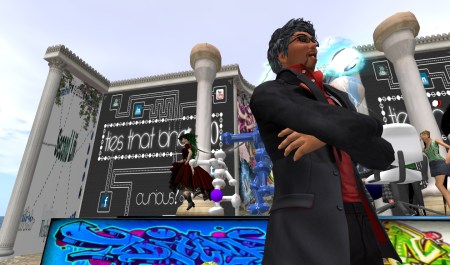
Sitearm Madonna outside the Dublin Amphitheatre.

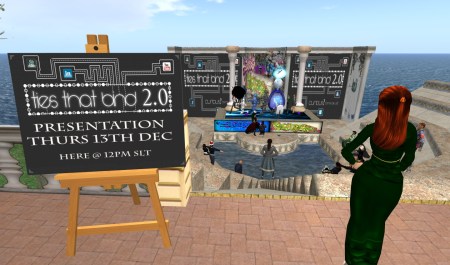
The students’ presentation of their projects at the Amphitheatre in Dublin Virtually Live was a real success. A good crowd (including a liberal scattering of pirates) came along and guest judges Elfay Pinkdot and Sitearm Madonna were in attendance.

Acuppa Tae, aka John O'Connor, introduces the students.

Acuppa Tae, aka John O’Connor, introduces the students.

Acuppa Tae Introduced the groups, who presented their projects magnificently, commencing with Inish Karu, B.ro, Seranox and Ace Regan; continuing with Dudley Dreamscape, Box of Chocolates, Thomas Tully and Sofia; and concluding with Fenix Muhindra and KautoStar.

The Amphitheatre in Dublin Virtually Live.

The Amphitheatre in Dublin Virtually Live.

Following the presentations students responded to questions from the judges and Locks Aichi and this was followed by a general discussion with member of the audience.

The event was a tremendous success from every point of view and particular credit is due to the participants for the significant efforts put into the event. Well done to you all and congratulations!

More photographs here.

ACTIVITIES FOR NEXT CLASS:

  • [and you thought the module was complete…!]
  • Tae and Locks will be available next week 20 December during normal class time 8.00 to 9.00 pm Irish Time (12 noon to 1 pm SL Time) for feedback on your presentations and/or blogs, or to answer any other questions you may have.
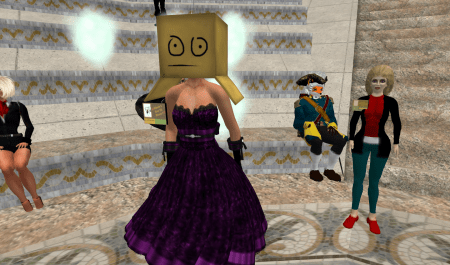
Box of Chocolates at the Dublin Amphitheatre…

Box of Chocolates at the Dublin Amphitheatre…

…and in the Fr Ted Corner at DIT Mountjoy Square.

…and in the Fr Ted Corner at DIT Mountjoy Square.

h1

Class 9: Wrapping up

December 7, 2012

CLASS SUMMARY:

We have almost reached the conclusion of the module. Next week sees the presentation of students’ projects so Locks and Tae met with each group of students individually. We discussed the dynamics of the group, the tools used to facilitate cooperation and planning and the intended approach to the presentation.

Feedback on each student’s blog was also given.

The rest of the class was given over to project work and final planning for the presentation.

ACTIVITIES FOR NEXT WEEK:

  • Complete the group project for presentation.
  • Check that all required blog entries have been posted.
h1

Class 8: Dublin Virtually LIve

November 30, 2012

CLASS SUMMARY:

The class started with a review of progress on the group projects. It was decided that the presentations would take place at the Dublin Amphitheatre (although group 2 suggested they may need to present at a different location – this will be confirmed next week). Each presentation should last between five and ten minutes. Participants were reminded that part of the brief is to promote your presentation and ensure a relevant audience attends.

Sitearm Madonna returned this week and was joined by Ham Rambler, the creator of Dublin Virtually Live. The slide show can be see here. Ham spoke about the origins of Dublin in Second Life. As an airline pilot he has travelled widely across the real world and noticed that wherever he went he usually found an Irish bar. The notion to develop an equivalent in SL led to him opening the Blarney Stone in the early days of the virtual world. The immediate success of the venture was due to the unique qualities of the Irish bar: a safe, friendly, welcoming environment where people could meet and socialise. This led Ham to develop a virtual replica of the city. He flew an experienced designer/builder to Dublin for a weekend to document Dublin photographically and commence the project, of which the first phase took about three months to complete. The new Blarney Stone was based on the real life Oliver Synge Gogarty pub in the Temple Bar cultural quarter of Dublin. In 2010 Ham brought delegates of the Meta Meets conference in Dublin to the bar and met the owner who told him people from all over the world were visiting the place having first come across it in SL.

Snapshot_001

The launch of Dublin Virtually Live was a major event in SL and was also covered by the media in the real world. It attracted the attention of multinational brands such as IBM keen to explore the possibilities of virtual worlds for marketing and promotion. Dublin Tourism also saw the opportunity to promote the city.

The project demonstrated Sitearm’s proposition that ‘We Are All Content Creators All the Time (WAACCAT). Site also summarised the issues around intellectual property and copyright; how to protect what you create and the recent development of the Creative Commons licence. The class discussion ranged across approaches to developing and protecting our content, cost of creation versus the market value of our efforts, alternatives to monetary commerce such as barter and distribution.

Sitearm concluded by reminding us to keep account of the content we create. This becomes more important as we progress in our careers and reputations develop into capital worth.

However, content may not always be what it seems, warns Ham, as he described the hoax of Dublin Coastal Development that was merely a mechanism to promote a new property development company. It succeeded massively, even making the primetime news bulletin on national television.

ACTIVITIES FOR NEXT CLASS:

  • This week is the second assessment point for your blogs so ensure they are up to date.
  • Write a post to your blog reflecting on your own particular contribution to the development of the group project. It is important to consider the shortcomings and failures in addition to the successes. Indeed, there is a greater opportunity for learning when you reflect on what went wrong and how you might improve your contribution in future team projects.
  • Prepare a short presentation to be given in the next class describing your project and the progress made so far.
  • Remember, your project presentation is only two weeks away.
h1

Class 7: Team working

November 23, 2012

CLASS SUMMARY:

We started with some discussion on the students’ blogs and suggested that you review the ACTIVITIES FOR NEXT WEEK sections for each class to ensure you have written the required posts. We also had a a quick review from each team on progress in the group project. As is normal at this stage in the module some teams appear to be making more progress than others. Locks and Tae reminded students that the purpose of the project was to give participants the opportunity to discover the joys AND difficulties in working with others online and to learn something about the differences between online collaboration and real life team working. Participants were also reminded that even though this is a group project you will be assessed individually: based on your feedback in class; participation; and critical reflection on the process in your blogs.

Sitearm Madonna, guest lecturer, then delivered his talk on team working in an online environment. Accompanying slides can be seen here. Commencing with an explanation of ‘le nom en ligne’ concept (similar to nom de plume and nom de guerre) he went on to talk about the challenges of collaborating with others online. As a graduate of the module he is in a good position to give participants some guidelines on how to work on the group project. Site gave an overview of how teams work, the roles of individual team members and referred to the Belbin approach. He emphasised the importance of all nine roles being activated: meaning that you will need to take on more than one role at different times during the project.

Then he spoke about the importance of clarity around the group’s presentation of their project and how easy it is to leave your audience confused. The most common mistake when presenting is for the participants to be unclear about their key message. Site suggests it is ‘impossible to underestimate the ability of an audience to understand you’! He described a range of tools teams can use to support the planing and development of their project.

Finally, Site spoke about identities and affiliations. He described how multiple affiliations lead to multiple identities and the importance of being aware of your online presence. He concluded with a warning to guard your privacy, keep space between your identities and post appropriately.

Sitearm will return next week to talk about content creation online.

Following some discussion we visited the Dublin Virtually Live Conference venue. Site offered support to the teams in developing their projects and said participants could use either the amphitheatre or the Conference venue for their presentations. We agreed to make a decision on the venue at next week’s class.

ACTIVITIES FOR NEXT CLASS:

  • Write a post to your blog comparing your experience of team work with the description outlined by Sitearm, particularly with reference to Belbin’s Nine Team Roles.
  • Decide on your preferred venue for the presentation. We will make a decision at next week’s class. (It was agreed that all presentations should take place in the same venue because the logistics of moving everyone around SL would be insurmountable.)